CAGR Calculator Excel Download: Understanding how fast your investments grow over time is one of the most critical skills in personal finance and long-term wealth planning. Absolute returns often mislead investors, especially when investments span multiple years, irregular cash flows, or volatile market phases. This is where CAGR becomes the gold standard metric for serious investors.
If you are searching for a CAGR Calculator Excel that works flawlessly for Indian investments, this detailed guide will help you master the concept, formulas, shortcuts, and practical Excel applications used by professionals. By the end of this article, you will also get access to a premium-looking, ready-to-use CAGR Calculator Excel sheet that eliminates manual errors and saves time. Okay, let’s get started.
What Is CAGR and Why It Matters in Investment Analysis?
CAGR stands for Compound Annual Growth Rate. It represents the smoothed annual return of an investment over a specific period, assuming the investment grows at a constant rate every year.
Unlike simple average returns, CAGR considers the power of compounding, making it the most accurate metric to compare investments with different time horizons.
Why CAGR Is Preferred by Investment Experts?
- Removes the impact of short-term volatility
- Enables apples-to-apples comparison across assets
- Reflects true long-term performance
- Widely used for mutual funds, stocks, SIPs, and business valuation
Whether you are tracking equity mutual funds, direct stocks, real estate, or portfolio performance, CAGR provides clarity where raw percentages fail.
Download CAGR Calculator Excel Sheet (Premium Template)
Take the guesswork out of investment analysis with our professionally designed CAGR Calculator Excel Sheet, built specifically for Indian investors, financial planners, and long-term wealth creators.
📄Download CAGR Calculator Excel Sheet – Premium Version
Ready-to-use | Free to download | Beginner-friendly
This premium Excel template automatically calculates CAGR, future value, reverse CAGR, quarterly CAGR, and SIP CAGR (XIRR) without requiring any manual formulas. Just enter your investment details and get accurate, instant results with a clean growth chart.
Whether you are evaluating mutual funds, stocks, SIPs, or long-term financial goals, this Excel sheet helps you make confident, data-driven decisions in minutes.
What You Get in the Excel Sheet Download?
- Fully automated CAGR calculator (no formulas to edit)
- Reverse CAGR & future value calculator
- SIP CAGR using XIRR (mutual fund–accurate)
- Quarterly & annual compounding support
- Built-in investment growth chart
- Locked formulas for error-free use
- Compatible with Excel, Google Sheets & mobile
Also Check: Lumpsum + SIP Calculator Excel Download
How to Use the CAGR Calculator Excel Sheet (Premium Version)?
Step 1: Enter the beginning investment value in the input cell. This is your initial lump sum or portfolio value.
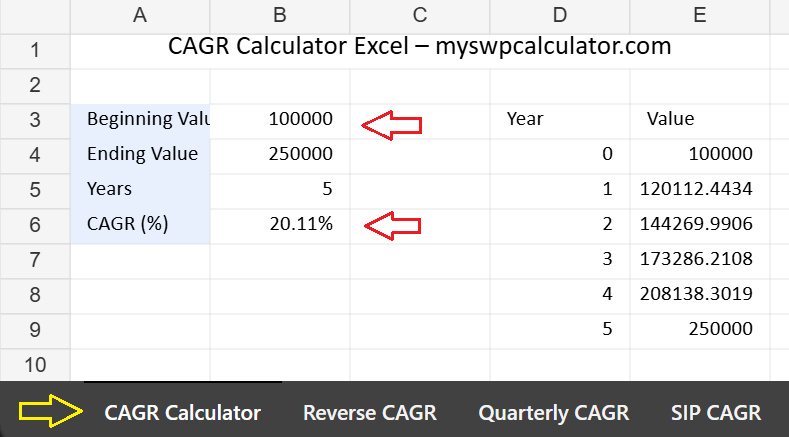
Step 2: Enter either the ending value or the expected CAGR, depending on whether you want to calculate growth rate or future value.
Step 3: Select the investment duration in years. The calculator supports short-term, long-term, and quarterly compounding scenarios.
Step 4: Instantly view the calculated CAGR, future value, or reverse CAGR, along with an automatic investment growth chart.
Step 5: Switch to the SIP CAGR (XIRR) tab to calculate accurate returns for systematic investments using real cash flows.
All calculations are automated with locked formulas, so no manual formula entry is required.
CAGR Formula Explained in Simple Terms
The standard CAGR formula is:
CAGR = (Ending Value / Beginning Value) ^ (1 / Number of Years) − 1
This formula calculates the constant annual growth rate required for an investment to grow from its initial value to its final value over a given time period.
Key Variables Used in CAGR Calculation
- Beginning Value: Initial investment amount
- Ending Value: Final portfolio or asset value
- Number of Years: Investment duration in years
CAGR Formula Excel Shortcut Used by Professionals
Excel simplifies CAGR calculations using built-in functions, eliminating the need for complex math.
Standard CAGR Formula in Excel
=(B2/A2)^(1/C2)-1
Where:
- A2 = Beginning Value
- B2 = Ending Value
- C2 = Number of Years
Format the cell as a percentage to get the CAGR result. This is the most widely used CAGR formula Excel shortcut among financial planners and analysts.
How to Calculate End Value from CAGR in Excel?
Sometimes investors know their starting capital and expected CAGR but want to calculate the future value.
Excel Formula to Calculate End Value Using CAGR
=Beginning_Value*(1+CAGR)^Years
Example:
- Investment: ₹1,00,000
- CAGR: 12%
- Time Period: 10 years
Excel Formula:
=100000*(1+12%)^10
This method is extremely useful for goal-based investment planning, retirement projections, and SIP maturity estimation.
3 Year CAGR Formula Excel With Practical Example
Short-term performance analysis is common in equity investing.
Excel Formula for 3 Year CAGR
=(Ending_Value/Beginning_Value)^(1/3)-1
Example:
- Start Value: ₹2,00,000
- End Value after 3 years: ₹3,00,000
Result gives the annualized growth rate over three years, smoothing market ups and downs.
5 Year CAGR Formula Excel for Long-Term Investors
Longer periods provide more reliable performance insights.
Excel Formula for 5 Year CAGR
=(Ending_Value/Beginning_Value)^(1/5)-1
This formula is commonly used to:
- Compare mutual funds
- Evaluate long-term stock returns
- Analyze portfolio performance
A 5-year CAGR is often considered the minimum benchmark for equity investments.
CAGR Formula Excel Quarterly Returns Explained
Not all investments compound annually. Some compound quarterly.
Excel Formula for Quarterly CAGR
=(Ending_Value/Beginning_Value)^(1/(Years*4))-1
To convert quarterly CAGR into annual CAGR:
=(1+Quarterly_CAGR)^4 – 1
This approach is useful for:
- Corporate earnings growth
- Business valuation models
- Quarterly performance reporting
Reverse CAGR Calculator Explained for Backward Analysis
A reverse CAGR calculator works backward to find the starting value when the ending value, CAGR, and time period are known.
Reverse CAGR Formula in Excel
=Ending_Value/(1+CAGR)^Years
This is widely used by:
- Financial planners
- Startup valuation analysts
- Investment goal planners
It helps answer questions like: “How much should I invest today to reach ₹1 crore in 15 years at 11% CAGR?”
SIP CAGR Calculator Excel for Mutual Fund Investors
SIP returns cannot be calculated accurately using standard CAGR formulas because investments happen at different times.
Best Method for SIP CAGR Calculation in Excel
Use the XIRR function instead of CAGR.
=XIRR(values, dates)
However, advanced CAGR Calculator Excel sheets often integrate SIP cash flows and automatically compute effective CAGR for SIP portfolios.
A premium SIP CAGR calculator Excel helps investors:
- Track real portfolio performance
- Compare SIP vs lump sum returns
- Avoid misleading average return figures
Features of a Premium CAGR Calculator Excel Sheet
A professional-grade CAGR Calculator Excel should include:
- Auto-calculation fields
- Error-proof formulas
- CAGR, reverse CAGR, and end value calculators
- SIP CAGR support
- Quarterly and yearly CAGR options
- Clean, premium layout
- Mobile-friendly Excel structure
This is exactly what the downloadable Excel template below offers.
Frequently Asked Questions on CAGR Calculator Excel
1. Is CAGR better than absolute return?
- Yes, CAGR reflects time-adjusted growth and is more accurate for long-term investments.
2. Can CAGR be negative?
- Yes, If the ending value is lower than the starting value, CAGR will be negative.
3. Is CAGR applicable to SIP?
- Directly no, SIPs require XIRR, but advanced Excel sheets convert SIP performance into effective CAGR.
4. Does CAGR guarantee future returns?
- No, CAGR only measures past or assumed growth. Markets are inherently uncertain.
5. Which CAGR is considered good in India?
- For equity investments, 12–15% CAGR over the long term is considered strong.
Final Words
A CAGR Calculator Excel is not just a convenience tool but a necessity for anyone serious about investments, portfolio tracking, or financial planning. CAGR cuts through noise, volatility, and misleading averages to present a clean, standardized measure of growth that professionals rely on.
Whether you are calculating a 3 year CAGR formula Excel for short-term analysis, using a 5 year CAGR formula Excel for mutual fund comparison, estimating future corpus values, or applying a reverse CAGR calculator for goal planning, Excel remains the most powerful and flexible platform.
A well-designed CAGR Calculator Excel sheet eliminates human error, saves time, and brings clarity to financial decisions. When paired with SIP CAGR calculation logic and quarterly compounding options, it becomes a complete investment analysis toolkit.
Investors who consistently track CAGR make better decisions, set realistic expectations, and stay disciplined through market cycles. Using a premium Excel template ensures accuracy, professionalism, and confidence in every financial projection you make.
I hope the above guide and our premium CAGR xcel calculator will help you to plan your investments easily. If you still have any questions on our excel calculator and investment tips please feel free to ask in the below comment section. Follow our site for more investment guides and tools. Thanks for your visit.
Tags: How to calculate end value from CAGR in Excel, CAGR formula Excel shortcut, 5 year CAGR formula Excel, 3 year CAGR formula Excel, CAGR formula Excel quarterly, reverse cagr calculator, sip cagr calculator excel.