Swp Calculator Excel Sheet Download: Systematic Withdrawal Plans (SWPs) have become one of the most dependable income-generation strategies for mutual fund investors. Whether you’re planning retirement, creating a steady monthly cash flow, or simply withdrawing profits smartly, an SWP Calculator Excel template gives you complete visibility into how long your corpus can last. But most online calculators ignore inflation, tax impact, and actual NAV growth cycles. That’s why a customizable Excel sheet is the smartest way to project realistic outcomes.
This guide gives you everything you need: a free SWP calculator Excel sheet, how it works, the formulas behind it, and a detailed explanation of creating your own SWP calculator with inflation Excel template. If you are serious about financial planning, this article will help you make more confident withdrawal decisions.
What is an SWP Calculator Excel and Why Investors Need It
An SWP Calculator Excel is a ready-made spreadsheet that calculates how long your mutual fund corpus will last when you withdraw a fixed amount periodically. Unlike online tools, Excel gives you full control over formulas, inflation assumptions, expected return rate, and cash flow charts, providing a deeply personalized projection.
Why Excel-based SWP Calculators are Better?
- You can modify the return rate as per market cycles
- Add inflation to adjust future withdrawal needs
- Track month-by-month corpus depletion
- Visualize impact of return volatility
- Use it offline anytime
- Create multiple scenarios before finalizing an income plan
For investors depending on mutual funds for monthly income, these spreadsheets act like a personal financial dashboard.
Get the free Swp Calculator Excel — Download the premium, editable Excel template with inflation formulas.
Download SWP Calculator Excel Sheet
How To Use The SWP Calculator Excel Sheet?
Your Excel sheet has 2 main parts:
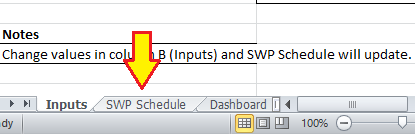
- Inputs Sheet → You enter your values here.
- SWP Schedule Sheet → It automatically shows the calculation output.
Let’s break it down very simply.
STEP 1 — Open the Excel Sheet & Go to “Inputs” Sheet
You will see this:
- Initial Corpus (₹)
- Monthly Withdrawal (₹)
- Expected Annual Return (%)
- Expected Annual Inflation (%)
- Start Date
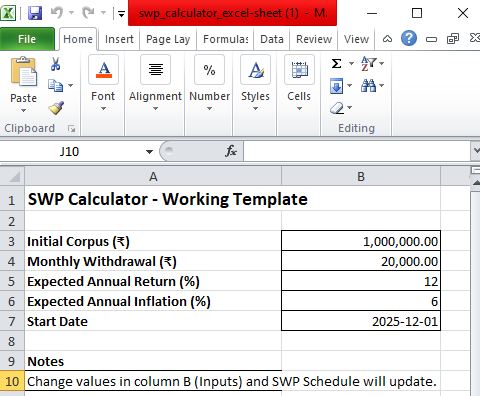
This is where you enter YOUR numbers.
STEP 2 — Enter Your Inputs (This Runs the Calculation)
- Initial Corpus (₹): How much total money you are investing
Example: 10,00,000
Just click the cell and type your number.
- Monthly Withdrawal (₹): How much income you want every month
Example: 20,000
This is the monthly SWP amount.
- Expected Annual Return (%): How much return your mutual fund will give yearly
Example: 10 or 12
Enter only the number (no % symbol needed).
- Expected Annual Inflation (%): If you want your withdrawal to increase every year (inflation adjustment)
Example: 6
If you set inflation to 0 → withdrawals remain fixed.
- Start Date: Your withdrawal start month
Example: 2025-12-01
STEP 3 — Go to “SWP Schedule” Sheet
This is the OUTPUT area.
Here you will see: Month-by-month calculation
✔ Opening balance
✔ Monthly return earned
✔ Withdrawal amount (inflation-adjusted)
✔ Closing balance
✔ When your money will be over
These values update automatically based on the Inputs.
STEP 4 — Understand the Output Columns
| Column | Meaning |
| Month No | 1, 2, 3… (each month of your SWP) |
| Month Start | Start date of each month |
| Opening Balance | Balance before withdrawal |
| Return Earned | Monthly profit earned |
| Withdrawal (Adj) | Monthly withdrawal (inflation applied) |
| Closing Balance | Balance after return – withdrawal |
STEP 5 — How the Calculator Works When You Change Inputs
Example:
If you change Monthly Withdrawal from 20,000 → 30,000
→ Your Closing Balance will drop faster
→ The “Corpus becomes 0” month will come sooner
If you change Annual Return from 12% → 10%
→ Monthly return reduces
→ Corpus depletes sooner
If you increase Inflation from 6% → 8%
→ Monthly withdrawal increases every month
→ Money finishes faster
STEP 6 — Check Summary (At Bottom of SWP Schedule)
Here you see:
When your corpus will become zero
Example: “132 months” → Your money lasts 11 years
Total withdrawn amount
Total money you took out with SWP
Ending balance
How much money is left after full SWP period
STEP 7 — View the Dashboard
The Dashboard sheet shows:
📉 Corpus trend chart
📊 Key inputs
📊 Withdrawal details
It helps visualize the performance.
VERY IMPORTANT – The Calculator Works Automatically
You never need to press any button.
You only do this:
✔ Enter your numbers → Initial Corpus / Withdrawal / Return / Inflation
✔ Go to SWP Schedule → and read the output
The formulas run themselves.
Key Features of a Good SWP Calculator Excel Template
A professionally structured swp calculator excel sheet download should include:
- Input Section
- Initial investment amount
- Expected annual return (CAGR)
- Monthly withdrawal amount
- Inflation rate
- Investment tenure
- Start date of withdrawal
- Processing Section
This part handles formulas for:
- Monthly return on corpus
- Inflation-adjusted withdrawals
- Remaining balance calculation
- Breakeven and zero-corpus forecasting
- Output Section
Your Excel sheet should clearly show:
- Month-wise corpus balance
- Total withdrawals taken
- Inflation impact
- Tenure before corpus becomes zero
- Graphs for easy visualization
This clarity helps investors make smarter decisions and avoid over-withdrawal mistakes.
How the SWP Calculator Excel Formula Works?
Most users do not know that SWPs work on the principle of reverse compounding. When you withdraw, your corpus reduces, and future growth also reduces proportionally. Excel helps you calculate this process in a transparent mathematical manner.
Here are the formulas used:
- Monthly Return Calculation
If expected return is R (annual), monthly return rate is:
Monthly Return = R / 12
Example: 12% annual return → 1% monthly return
- Revised Corpus After Earning Return
If opening balance is A, monthly rate r, then:
Corpus after return = A × (1 + r)
- Withdrawal Adjustment
If withdrawal is W:
Closing Balance = Corpus after return – W
- Inflation Adjusted Withdrawal (Optional)
To calculate increasing withdrawal over time:
W(next month) = W × (1 + Inflation Rate / 12)
This is what makes a swp calculator with inflation excel more powerful than static online tools.
Example Calculation Table (Simplified)
Below is a sample representation with inflation included.
| Month | Opening Balance (₹) | Return Earned (₹) | Adjusted Withdrawal (₹) | Closing Balance (₹) |
|---|---|---|---|---|
| 1 | 1,000,000.00 | 10,000.00 | 20,000.00 | 990,000.00 |
| 2 | 990,000.00 | 9,900.00 | 20,016.00 | 979,884.00 |
| 3 | 979,884.00 | 9,798.84 | 20,032.03 | 969,650.82 |
| 4 | 969,650.82 | 9,696.51 | 20,048.06 | 959,299.27 |
This compounding-withdrawal cycle continues until the corpus becomes zero.
Benefits of Using an SWP Calculator with Inflation Excel
Inflation is the biggest silent risk for retirees. A static SWP creates a false sense of security. When your real purchasing power reduces, your lifestyle gets compromised.
A template with inflation helps you:
- Predict rising expenses
- Avoid running out of money early
- Set realistic withdrawal amounts
- Evaluate whether the corpus is enough for long-term goals
- Model worst-case and best-case scenarios
Advisors widely prefer inflation-linked SWP sheets for accurate planning.
Who Should Use an SWP Calculator Excel Sheet?
This spreadsheet is extremely valuable for:
- Retirees: Ensure predictable monthly income without destroying corpus too quickly.
- Freelancers & Self-Employed Individuals: Create personal “salary” from accumulated investments.
- Investors Taking Regular Profit Withdrawls: Manage systematic withdrawals without affecting long-term compounding.
- Financial Planners: Show clients realistic projections with transparent formulas.
Tips to Get Maximum Value from SWP Planner Excel Sheet
- Keep return assumptions conservative
- Review inflation rate every year
- Don’t withdraw more than 6–8% of corpus annually
- Run multiple simulations before deciding
- Use the sheet monthly to monitor real NAV impact
Best Practices for SWP Strategy
A good SWP plan is not just about withdrawals; it’s about balance.
- Choose the Right Mutual Fund Category
For SWPs, prefer:
- Short-term debt funds
- Balanced advantage funds
- Conservative hybrid funds
- Maintain Liquidity Cushion
Keep at least 6–12 months of withdrawal amount in liquid funds.
- Review Performance Annually
If fund returns drop significantly, reduce withdrawal pace.
- Use the Excel Calculator for Review
It acts as a real-time financial guardrail.
FAQs on SWP Calculator Excel Sheet
- What is the main advantage of using an SWP calculator Excel template?
It allows complete customization of returns, inflation, and withdrawals, giving more accurate projections compared to fixed online calculators.
- Is the SWP calculator Excel formula difficult?
Not at all. It uses simple compounding, inflation adjustment, and subtraction formulas repeated month-wise.
- Can Excel calculate inflation-adjusted withdrawals?
Yes, using a monthly inflation factor formula to increase the withdrawal amount automatically.
- Why do investors prefer SWP calculators with inflation?
Because real expenses rise every year, and static withdrawals give unrealistic projections.
- How often should I update my SWP sheet?
Ideally once a month after checking fund values and market performance.
- Can this sheet be used for retirement planning?
Absolutely. It is one of the most accurate tools for retirement income modeling.
Final Words
A well-designed Swp Calculator Excel sheet is more than just a calculator; it is a lifelong planning companion. Whether you are planning retirement, creating passive income, or simply withdrawing money smartly, an Excel template gives you full control, transparency, and personalization that online tools simply cannot match. By using inflation-adjusted formulas, month-wise cash flow tables, and compounding projections, you can clearly see how long your corpus will survive under every scenario.
The ability to simulate different return rates and withdrawal patterns makes this the smartest way to avoid financial stress later in life. Every investor who depends on mutual funds for monthly income should keep a fully-featured swp calculator excel template ready, review it regularly, and let data guide their decisions. When your financial planning is backed by a precise spreadsheet, your income becomes predictable, your expenses stay manageable, and your long-term wealth remains protected.
I hope the above guide will help you to know more about swp excel sheet calculator and its details. If you still have any questions on the above guide please feel free to ask in the below comment comment section. Follow this site for more swp and mutual fund related tips and tricks. Thanks for your visit.
Tags: swp calculator with inflation excel, swp calculator excel sheet download, swp calculator excel formula, swp calculator excel template, Best swp calculator excel, systematic withdrawal plan calculator excel download.