Smart mutual fund investing is not just about choosing the right scheme. It is about how and when money enters the market, how risk is managed, and whether returns truly beat inflation. For investors who prefer clarity, control, and offline planning, an STP Calculator Excel is one of the most powerful yet underused tools.
Most online calculators give quick numbers, but they rarely explain the logic behind STP returns or allow deep customization. An STP Calculator Excel download with inflation fills this gap by letting you simulate real-world scenarios, understand each calculation step, and plan transfers confidently without internet dependency.
Plan your systematic transfer strategy offline. Download our free STP Calculator Excel with built-in inflation adjustment and test real-world scenarios instantly.
In this post, you will get STP offline excel calculator, how STP works in mutual funds, how an STP calculator Excel functions, the exact calculation formula with example, and why inflation-adjusted offline calculators are essential for serious long-term investors.
What Is STP in Mutual Fund Investing?
Before understanding the calculator, it is important to understand what is STP in mutual fund investing. A Systematic Transfer Plan (STP) is a facility that allows an investor to transfer a fixed amount of money at regular intervals from one mutual fund scheme to another within the same fund house.

Typically:
- The source fund is a debt or liquid fund
- The destination fund is an equity or hybrid fund
- Transfers happen monthly or weekly
- Each transfer is treated as a fresh investment
STP is widely used by investors who have a lump sum but want to avoid market timing risk.
Why Investors Prefer Systematic Transfer Plan?
A systematic transfer plan offers multiple advantages compared to investing a lump sum directly into equity.
Key Benefits of STP
- Reduces market volatility risk
- Allows gradual equity exposure
- Earns returns in debt fund before transfer
- Enforces discipline similar to SIP
- Ideal for uncertain or volatile markets
However, understanding the actual returns of STP requires more than basic intuition. This is where an STP calculator excel becomes valuable.
What Is an STP Calculator Excel
An STP Calculator Excel is a spreadsheet-based tool that calculates returns generated through a systematic transfer plan using predefined formulas.
Unlike online calculators, Excel-based STP calculators allow:
- Offline usage
- Full transparency of formulas
- Customization of assumptions
- Scenario analysis
- Inflation adjustment
This makes Excel calculators especially popular among financial planners, advanced investors, and educators.
Why Use an STP Calculator with Inflation
One of the biggest mistakes investors make is ignoring inflation. If your investment grows at 11% but inflation averages 6%, your real growth is only about 5%. Without inflation adjustment, your planning becomes overly optimistic.
Importance of Inflation in STP Planning
- Shows real purchasing power
- Helps realistic goal setting
- Prevents retirement shortfall
- Improves long-term decision making
An STP calculator with inflation automatically converts nominal returns into real returns, which is critical for long-term financial goals.
STP Calculator Offline vs Online Calculator
Both online and offline calculators have their place, but Excel-based calculators offer unique advantages.
STP Calculator Offline Advantages
- Works without internet
- No ads or distractions
- Complete formula visibility
- Editable assumptions
- Ideal for presentations and audits
Limitations of Online Calculators
- Limited customization
- No access to backend logic
- Cannot store multiple scenarios
- Internet dependency
For investors who want precision and flexibility, an STP calculator offline in Excel is the superior choice.
Checkout our SWP mutual fund Calculator to plan your systematic withdrawal plan easily.
Inputs Used in an STP Calculator Excel
A well-structured STP calculator Excel uses the following inputs.
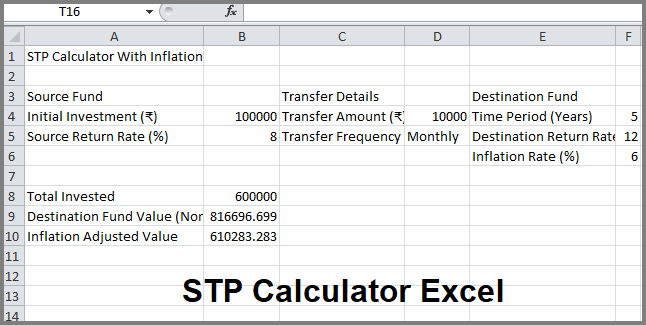
Source Fund Inputs
- Initial investment amount
- Expected annual return rate
Transfer Details
- Transfer amount per interval
- Transfer frequency (monthly or weekly)
Destination Fund Inputs
- Investment period in years
- Expected annual return rate
Inflation Input
- Annual inflation rate percentage
Once these inputs are entered, the calculator automatically computes the final values.
STP Calculation Formula with Example
Understanding the formula builds confidence in the results.
Basic STP Logic
Each transferred amount compounds independently in the destination fund for the remaining period.
Excel Formula Used
For monthly STP:
Future Value = FV(rate/12, total_months, -transfer_amount, 0)
Inflation Adjustment Formula
Inflation Adjusted Value = Final Value / (1 + inflation rate) ^ years
Example Calculation
| Parameter | Value |
| Initial Investment | ₹1,00,000 |
| Transfer Amount | ₹10,000 monthly |
| STP Duration | 5 years |
| Destination Return | 12% |
| Inflation Rate | 6% |
The calculator:
- Transfers ₹10,000 every month
- Each transfer compounds at 12%
- Final nominal value is calculated
- Inflation-adjusted real value is displayed
This layered compounding is difficult to compute manually, making Excel calculators essential.
What an Advanced STP Calculator Excel Shows?
A professional STP calculator Excel typically displays:
- Total amount transferred
- Destination fund nominal value
- Inflation-adjusted real value
- Effective investment period
- Clear separation of inputs and outputs
Some advanced versions may also include charts and tax estimates.
Who Should Use STP Calculator Excel Offline?
An STP calculator Excel download is useful for a wide range of users.
Ideal Users
- Lump sum investors
- Retirement planners
- Financial advisors
- Bloggers and educators
- Conservative equity entrants
- DIY investors who prefer offline tools
If you frequently test scenarios, Excel-based calculators offer unmatched flexibility.
Common Mistakes While Using STP Calculators
Even with good tools, mistakes can reduce accuracy.
Mistakes to Avoid
- Using unrealistic return assumptions
- Ignoring inflation
- Confusing STP with SIP
- Forgetting tax implications
- Assuming guaranteed returns
An Excel calculator helps spot these issues early by showing how sensitive outcomes are to small changes.
How to Use STP Calculator Excel Effectively
To get the most value:
- Keep return assumptions conservative
- Always include inflation
- Test best and worst-case scenarios
- Recalculate annually
- Align STP duration with goals
Excel allows you to duplicate sheets and compare strategies side by side, which is impossible with most online tools.
STP vs SIP in Practical Planning
STP and SIP are often compared, but they serve different needs.
STP Is Best When
- You already have a lump sum
- Market valuations are high
- You want phased equity entry
SIP Is Best When
- You invest from monthly income
- You want simplicity
- You do not hold large idle capital
An STP calculator Excel helps visualize why STP often outperforms lump sum investing during volatile periods.
FAQs on STP Calculator Excel
1. What is STP in mutual fund investing
- STP is a facility that transfers money systematically from one mutual fund scheme to another at fixed intervals.
2. Is STP calculator Excel accurate
- Yes, when correct formulas and realistic assumptions are used, Excel-based STP calculators are highly accurate.
3. Can I use STP calculator Excel offline
- Yes, once downloaded, the calculator works completely offline without internet access.
4. Does STP calculator Excel include inflation
- Advanced versions include inflation adjustment to show real returns instead of nominal values.
5. Is STP better than SIP
- STP is better for lump sum investors, while SIP suits regular monthly investors.
6. Are STP transfers taxable
- Yes, each transfer is treated as a redemption and taxed according to mutual fund tax rules.
Final Thoughts
An STP Calculator Excel is more than just a spreadsheet. It is a powerful financial planning companion that brings transparency, realism, and control to systematic transfer planning. Unlike basic online tools, an Excel-based STP calculator allows investors to understand each step of the calculation, test multiple scenarios, and evaluate outcomes with inflation-adjusted clarity.
By factoring inflation, investors avoid the illusion of high nominal returns and focus instead on real wealth creation. For lump sum investors entering equity markets, STP provides a disciplined, risk-managed approach, and Excel makes this strategy measurable and customizable.
Whether you are planning retirement, managing volatility, or educating others about systematic transfer plans, an STP calculator excel download with inflation empowers you to make informed, confident, and future-ready investment decisions in a way that online calculators simply cannot match.
I hope the above post will help you to get working stp offlice excel calculator for your mutual fund plans. If you still have any questions related to STP or any mutual fund plans please feel free to contact us. We are always ready to provide a financial solutions as soon as possible. Thanks for your visit.
Tags: stp calculator with inflation, stp calculator offline, stp calculator excel, stp calculator excel download, stp calculation formula with example, sip calculator excel sheet download, systematic transfer plan excel sheet download.